User Guide
TAHub is a desktop app for managing students, optimized for use via a Command Line Interface (CLI) while still having the benefits of a Graphical User Interface (GUI). If you can type fast, TAHub can get your student management tasks done faster than traditional GUI apps.
TAHub simplifies the role of Teaching Assistants by providing a centralized hub to organize student information, and efficiently manage course-related tasks. This platform empowers TAs to focus more on enhancing student learning and less on administrative chaos.
- Quick start
- Features
- Students
-
Consultations
-
Consultation Commands
- Adding a consultation :
addconsult - Refreshing the consultation list :
listconsults - Adding students to a consultation :
addtoconsult - Removing students from a consultation :
removefromconsult - Deleting consultations :
deleteconsult - Exporting consultation data :
exportconsult - Importing consultation data :
importconsult
- Adding a consultation :
-
Consultation Commands
- Lessons
Quick start
-
Ensure you have Java
17or above installed in your Computer.
To check your Computer’s Java Version, see this guide.
If you don’t have Java, see this installation guide. -
Download the latest
.jarfile from here.
Scroll down until you see this part. Click ontahub.jarto download it.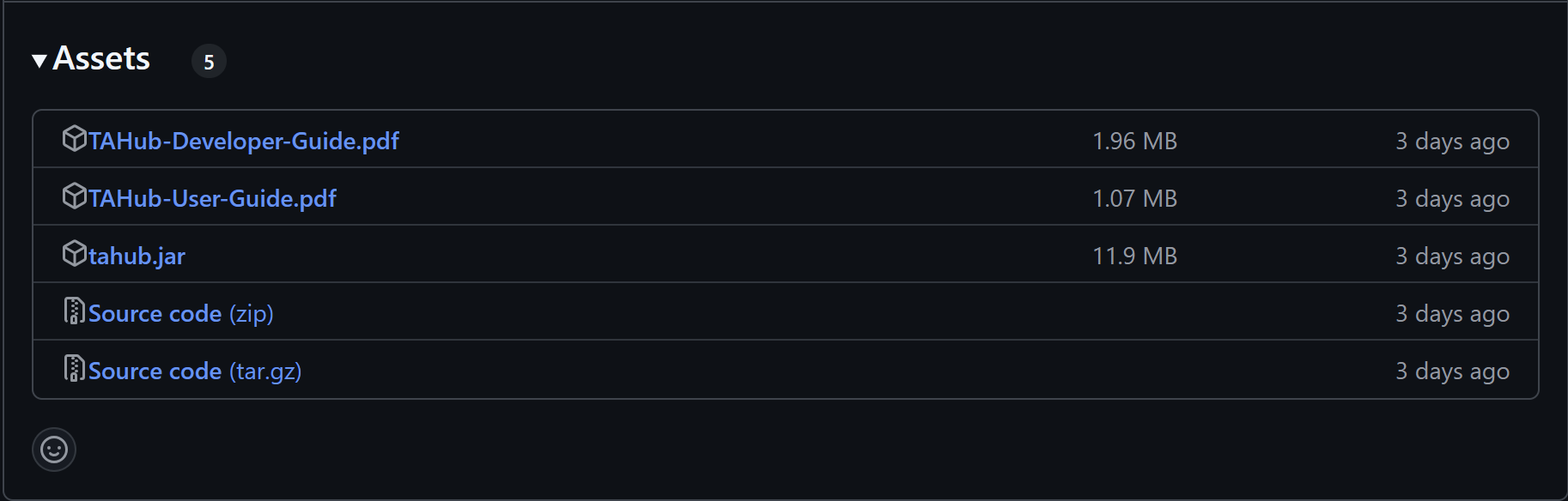
-
Copy the file to the folder you want to use as the home folder for your TAHub.
The home folder is where other files such as the data file will be created. -
Open a command terminal and
cdinto the folder you put the jar file in.
If you don’t know what that means, fret not - see here. -
Type
java -jar tahub.jarand hit enter.
A GUI similar to the below should appear in a few seconds.
Note how the app contains some sample data.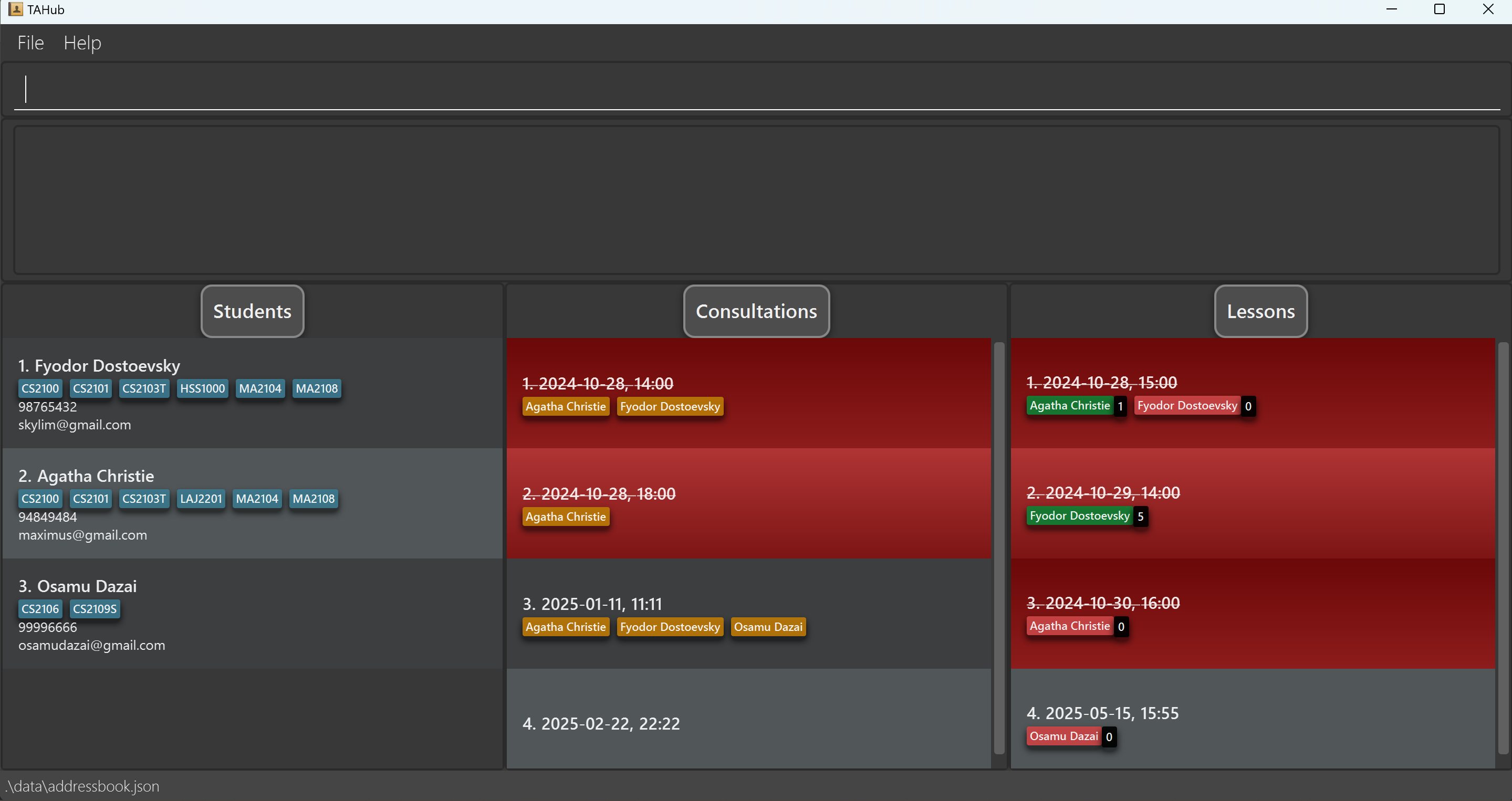
-
Type the command in the command box and press Enter to execute it. e.g. typing
helpand pressing Enter will open the help window.
Some example commands you can try:-
add n/John Doe p/98765432 e/johnd@example.com c/CS2103T;CS2101: Adds a student namedJohn Doeto TAHub. -
delete 2: Deletes the 2nd student shown in the current student list. -
clear: Deletes all students, consultations & lessons. -
exit: Exits the app.
-
-
Refer to the Features below for details of each command.
Features
How do I read the command format?
-
Main command keywords are case-sensitive unless specified otherwise.
e.g.FindandAdddo not work forfindandaddrespectively. -
Words in
UPPER_CASEare the parameters to be supplied by the user.
e.g. inadd n/NAME,NAMEis a parameter which can be used asadd n/John Doe. -
Items in square brackets are optional.
e.gn/NAME [c/COURSE]can be used asn/John Doe c/CS2103Tor asn/John Doe. -
Items with
…after them can be used multiple times including zero times.
e.g.[c/COURSE]…can be used as ` ` (i.e. 0 times),c/CS2103T;CS2101(note that use of;is unique to only some fields),c/CS2103T c/CS2101etc. -
Parameters can be in any order.
e.g. if the command specifiesn/NAME p/PHONE_NUMBER,p/PHONE_NUMBER n/NAMEis also acceptable. -
Extraneous parameters for commands that do not take in parameters (such as
help,liststudents,exitandclear) will be ignored.
e.g. if the command specifieshelp 123, it will be interpreted ashelp. -
If you are using a PDF version of this document, be careful when copying and pasting commands that span multiple lines as space characters surrounding line-breaks may be omitted when copied over to the application.
Additional Notes
Here are more detailed notes regarding certain parameters that apply to all commands unless specified otherwise.
-
When specifying an index, leading zeroes are ignored, i.e.
001is equivalent to1. -
When specifying an index, it should be between 1 and 2147483647, inclusive. The current error message may not reflect this requirement, but changes for clarification are planned in the future.
-
When targeting a student by their index, TAHub uses the indexes as currently displayed on the student list. For example, if you run a
findcommand that only lists one student out of originally five, trying to select a student at index 2 will fail.
General Commands
Viewing help : help
Shows a message explaining how to access the help page.

Format: help
Clearing all entries : clear
Clears all entries from TAHub.
Format: clear
Exiting the program : exit
Exits the program.
Format: exit
Students
The student list is shown on the left side of TAHub.
Currently, you can:
- Add, Edit and delete student
- Find Students by Name or Course
- Export & Import Student Data
In a student, courses are represented by course tags.
Name, Phone Number & Email are represented as texts.
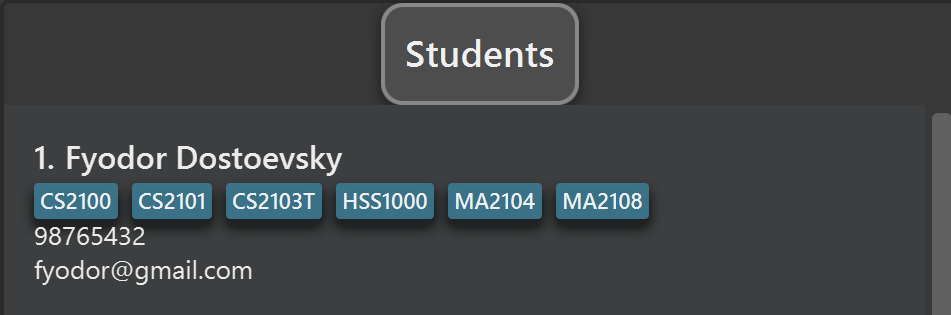
This is an example of a student. In this example,
the student’s name is Fyodor Dostoevsky,
studying courses CS2100, CS2101, CS2103T, HSS1000, MA2104 & MA2108,
has Phone Number 98765432 and Email fyodor@gmail.com.
Student Commands
Adding a student: add
Adds a student to TAHub.
Format: add n/NAME p/PHONE_NUMBER e/EMAIL [c/COURSE]…
 Tip:
A student can have any number of courses (including 0)
Tip:
A student can have any number of courses (including 0)
-
NAMEmust only contain alphabetical characters, commas, and spaces. -
NAMEmust be unique, i.e. no two students can have the same name.- However, names are case-sensitive, i.e.
John Doeis considered different fromjohn doe.
- However, names are case-sensitive, i.e.
-
PHONE_NUMBERshould only contain numbers, and should be at least 3 numbers long. -
EMAILshould conform to the formatlocal-part@domainand:-
local-partshould only contain alphanumeric characters and these special characters:+_.-. -
local-partmust start and end with alphanumeric characters. -
domainmust end with a domain label at least 2 characters long. -
domainmust have each domain label start and end with alphanumeric characters. -
domainmust have each domain label consist only of alphanumeric characters separated only if hyphens (if any).
-
-
COURSEs should begin with 2-4 letters, followed by 4 digits, followed by 0-2 letters. Example:MA1100,GEA1000N,GESS1000Tetc.
Examples:
add n/John Doe p/98765432 e/johnd@example.comadd n/Betsy Crowe e/betsycrowe@example.com p/1234567 c/CS2103T;CS2101-
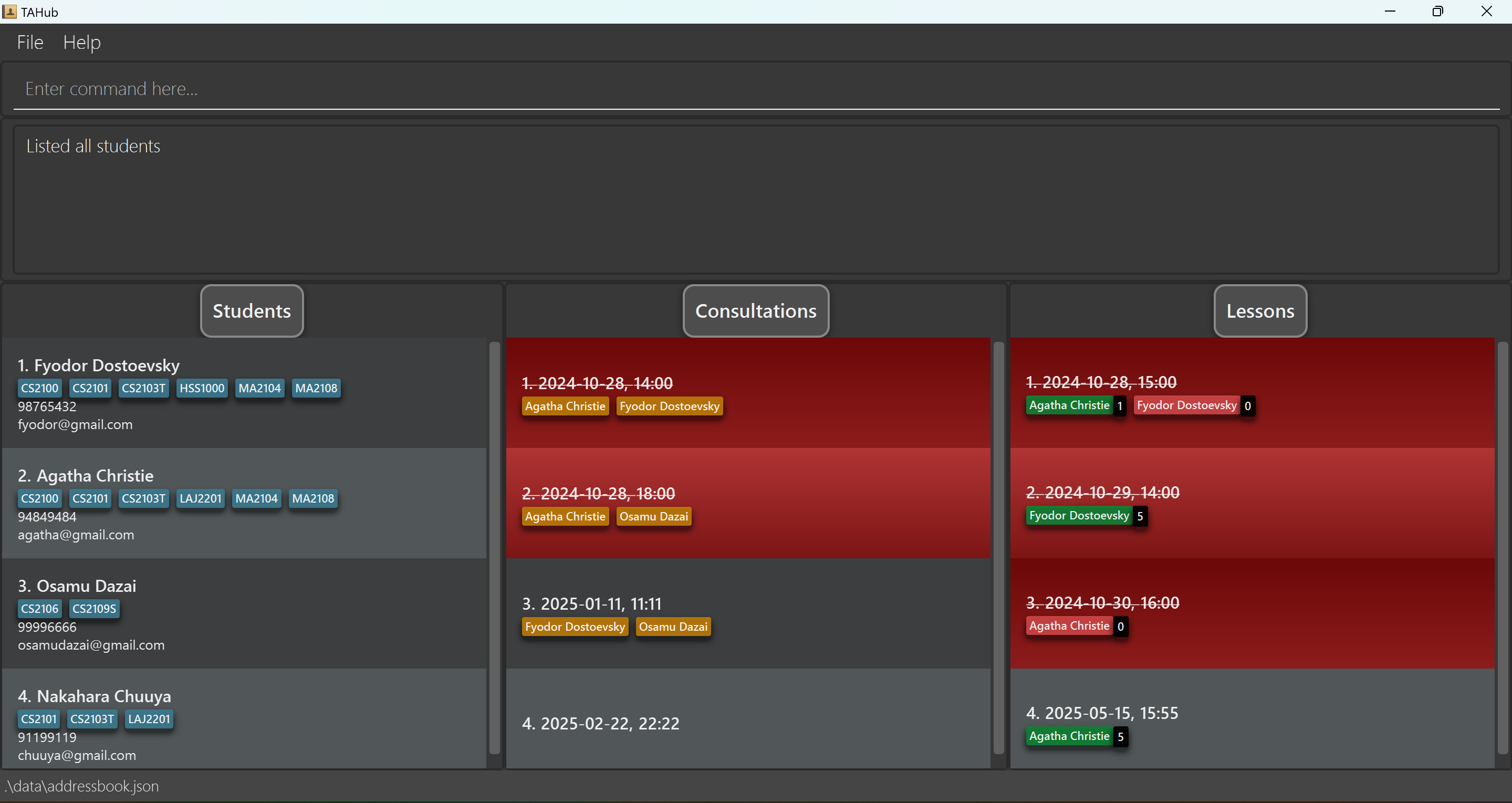
add n/Nakahara Chuuya p/91199119 e/chuuya@gmail.com c/LAJ2201;CS2103T;CS2101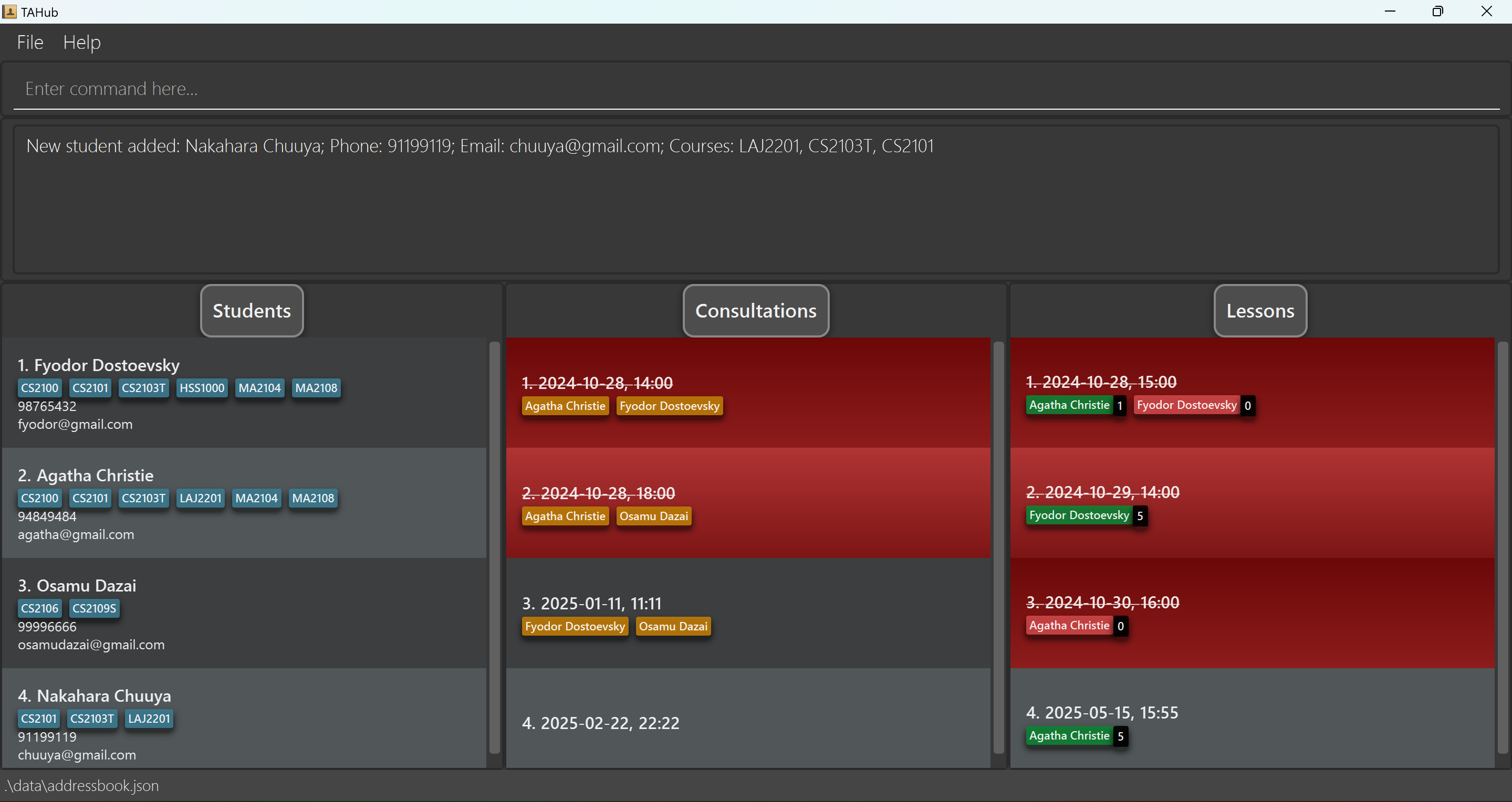
Listing all students :
liststudents
Shows a list of all students in TAHub.
Format: liststudents
Editing a student : edit
Edits an existing student in TAHub.
Format: edit INDEX [n/NAME] [p/PHONE] [e/EMAIL] [c/COURSE]…
- Edits the student at the specified
INDEX. The index refers to the index number shown in the displayed student list. The index must be a positive integer 1, 2, 3, … - At least one of the optional fields must be provided.
- Existing values will be updated to the input values.
- When editing courses, the existing courses of the student will be removed i.e adding of courses is not cumulative.
- You can remove all the student’s courses by typing
c/without specifying any courses after it.
Examples:
-
edit 1 p/91234567 e/johndoe@example.comEdits the phone number and email of the 1st student to be91234567andjohndoe@example.comrespectively. -
edit 2 n/Betsy Crower c/Edits the name of the 2nd student to beBetsy Crowerand clears all existing courses. -
edit 3 c/CS2103T;CS2101Edits the courses of the 3rd student to be CS2103T & CS2101. -
edit 4 p/91918181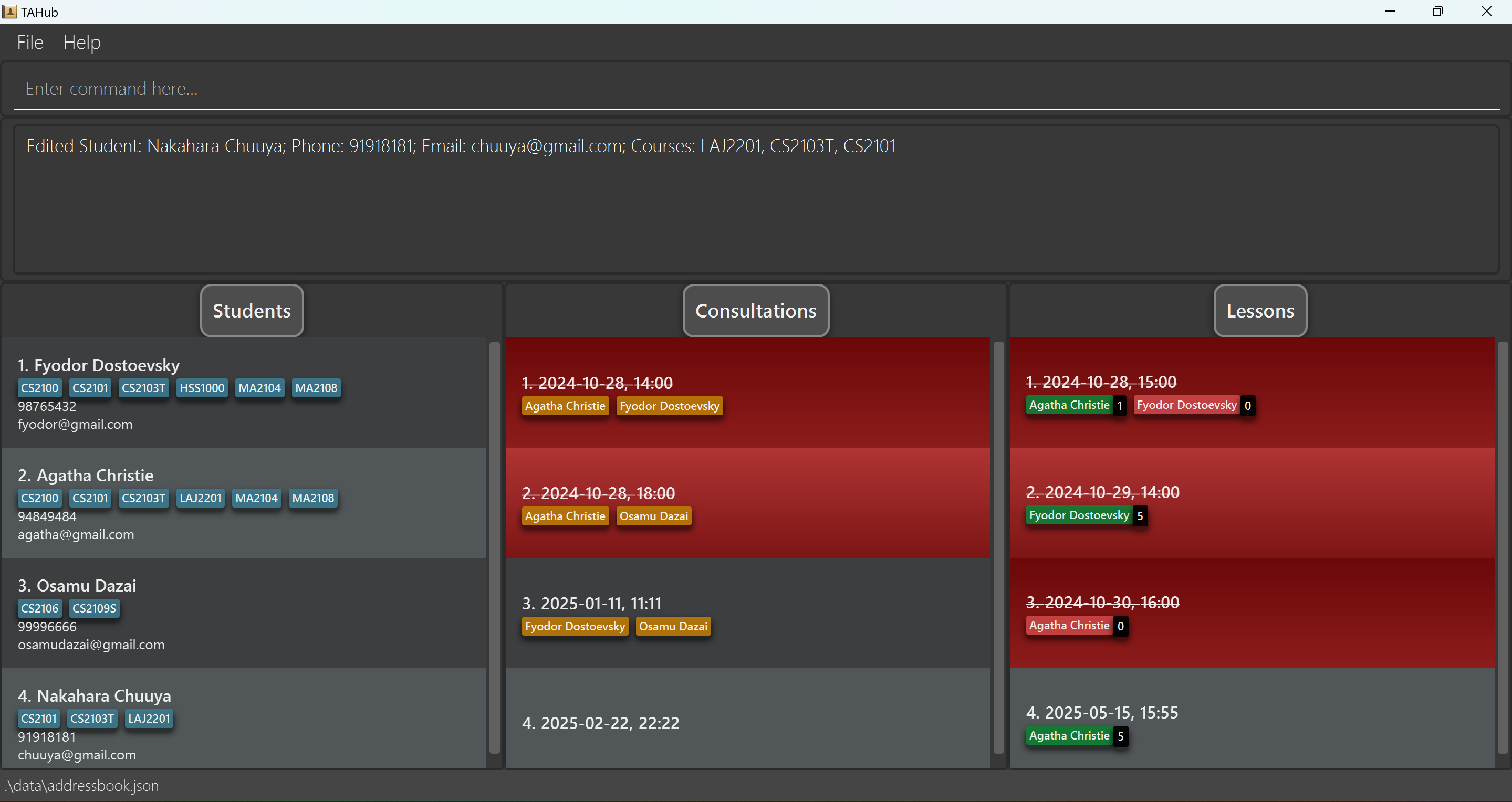
Locating students by name and/or course: find
Finds students whose names contain any of the given keywords.
Format: find KEYWORD [MORE_KEYWORDS]
- The search is case-insensitive. e.g
hanswill matchHans,cs2103twill matchCS2103T - Can search for names and courses. Use the
n/prefix to search for names and thec/prefix to search for courses. - Partial searches will be matched e.g.
Jamwill matchJamesandJames Ho - Each sequence of words not separated by
;or a prefix will be used as a search. This means thatjam howill not matchJames Ho - If a semicolon was used to separate searches, students matching at least one keyword will be returned (i.e.
ORsearch). - If a prefix was used to separate searches, students matching all keywords will be returned (i.e.
ANDsearch). - If no names are provided to the find command (i.e.
find n/), all students will be listed. -
Warning:
find c/will not be treated as an error and will return 0 students. Refer to the Proposed Features below for details of the proposed changes to this command.
Examples:
-
find n/JohnreturnsjohnandJohn Doe -
find n/alex;davidreturnsAlex Yeoh,David Li
-
find n/alex n/davidreturnsAlex David, if a student with that name exists -
find c/CS2103T c/CS2100will return students who are taking bothCS2103TandCS2100 -
find n/alex c/cs2103t;cs2100will return all students whose names containalexand are taking at least one ofCS2103TorCS2101. -
find n/will return all students. -
find c/will return no students. -
find n/Osamu;Chuuya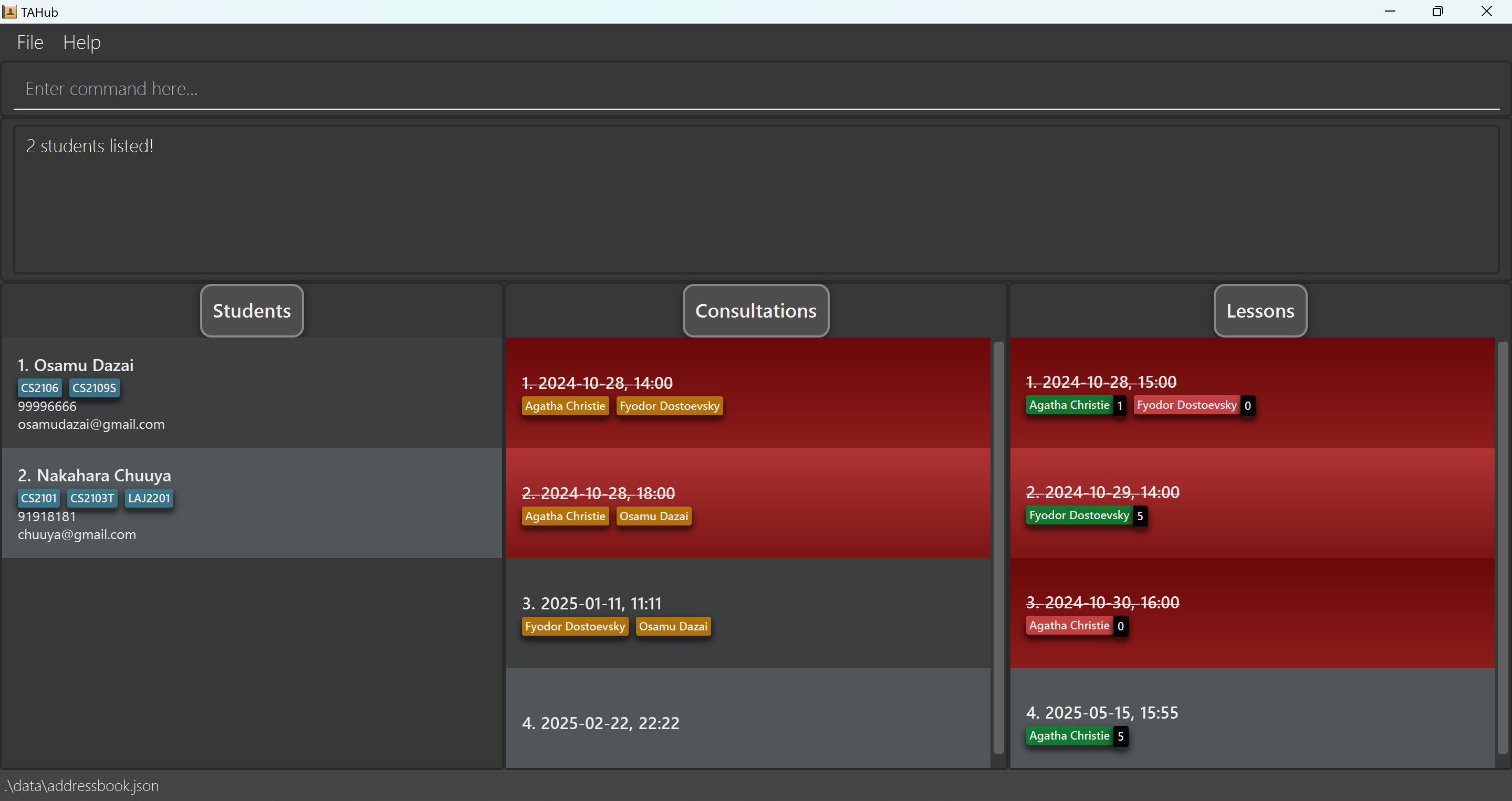
-
find c/CS2103T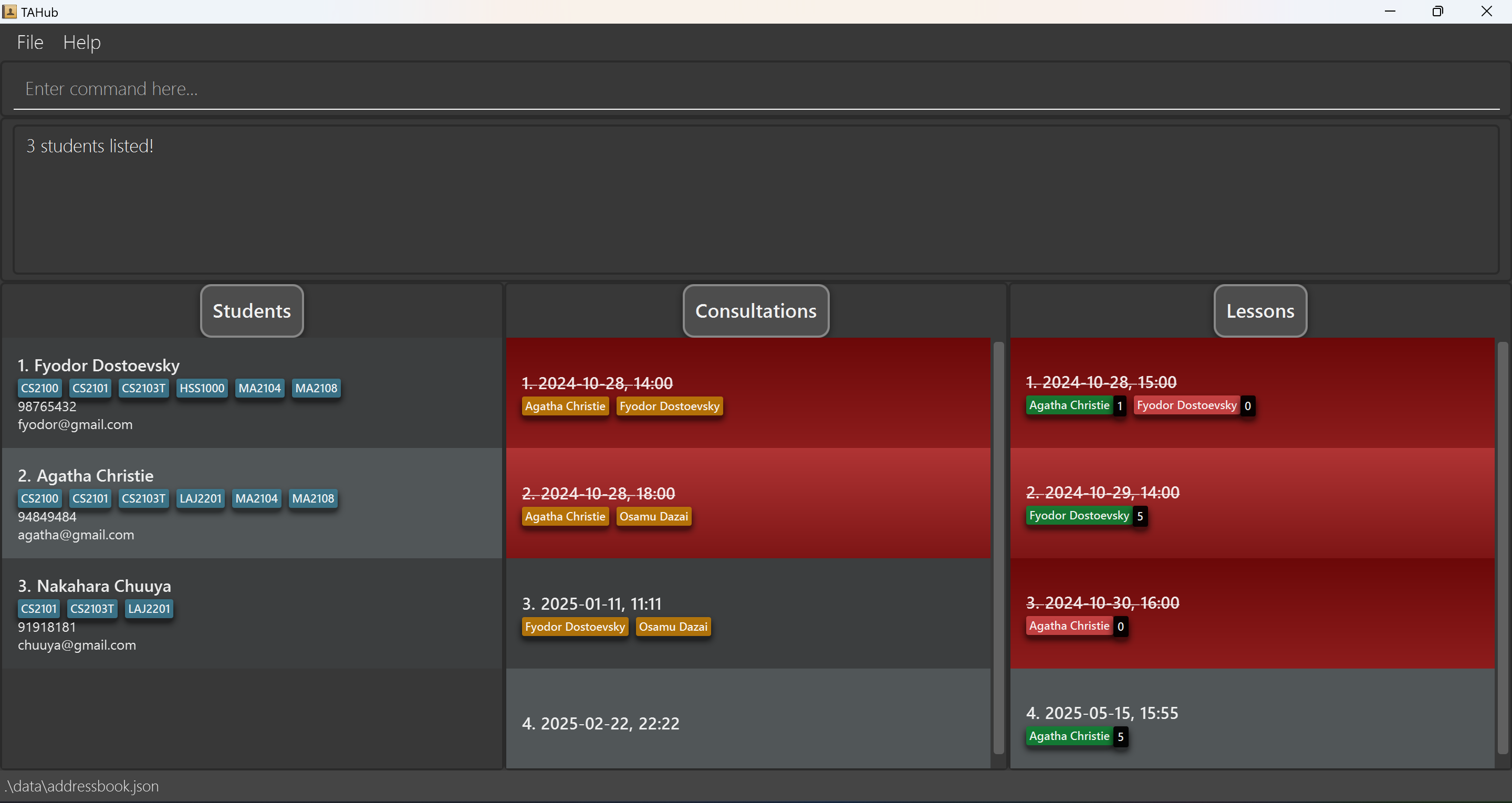
Deleting a student : delete
Deletes the specified student from TAHub.
Format: delete INDEX[;INDEX]…
- Deletes the student at the specified
INDEX. - The index refers to the index number shown in the displayed student list.
-
The index must be a positive integer 1, 2, 3, …
- Can delete multiple students at once by separating indices with semicolons (;).
Examples:
-
liststudentsfollowed bydelete 2deletes the 2nd student in TAHub. -
liststudentsfollowed bydelete 2;3deletes the 2nd and 3rd student in TAHub. -
find n/Betsyfollowed bydelete 1deletes the 1st student in the results of thefindcommand. -
liststudentsfollowed bydelete 4deletes the 4th student in TAHub.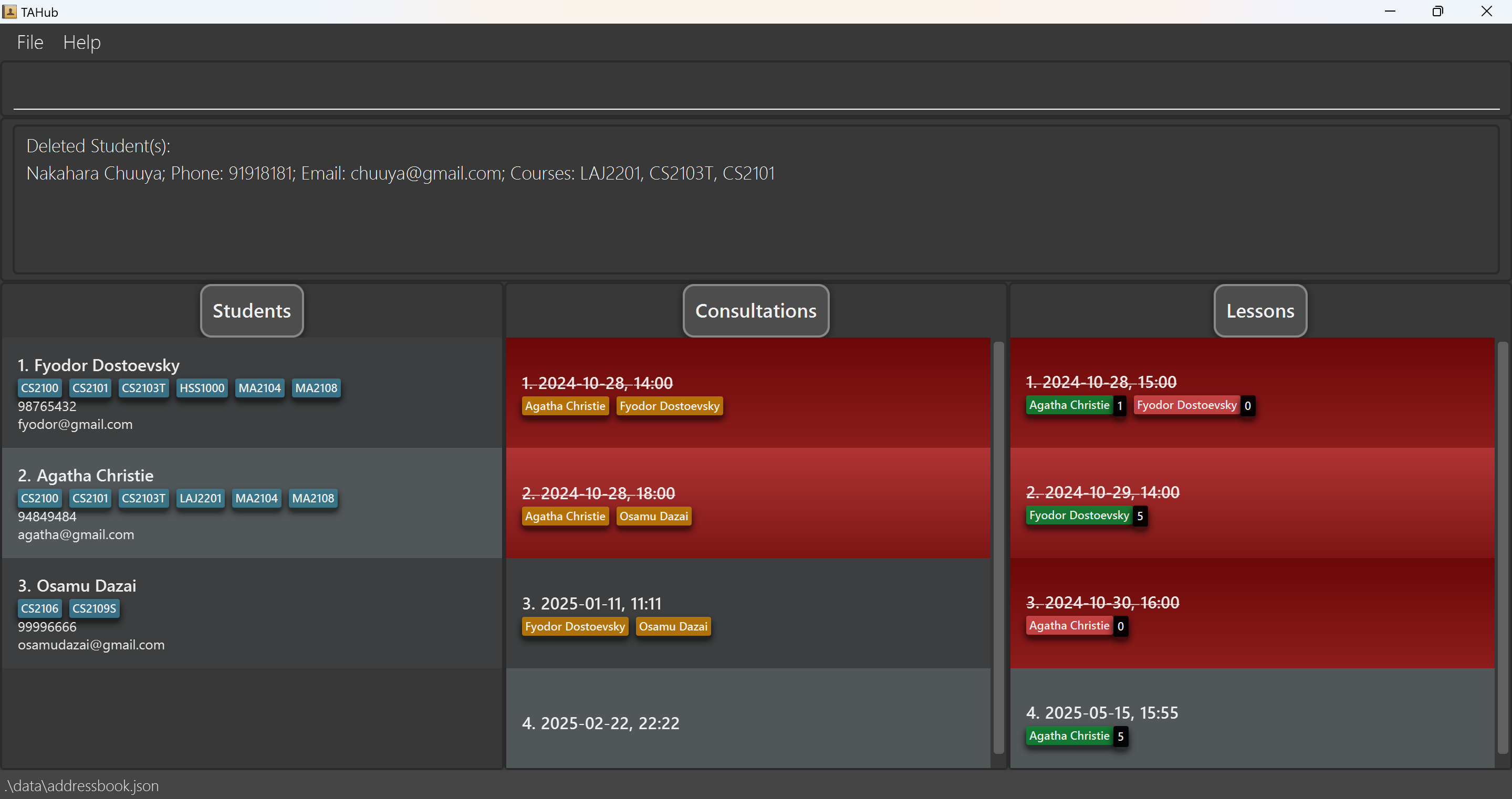
Exporting student data : export
Exports the current list of students to a CSV file.
Format: export [-f] FILENAME
- Exports student data to ‘FILENAME.csv’ in both the data directory and user’s home directory
- The
-fflag is optional and allows overwriting of existing files - The filename must contain only alphanumeric characters (A-Z, a-z, 0-9)
- Files are saved in both the data directory and home directory
- If the home directory copy fails, only the data directory file is created
Examples:
-
export studentscreates students.csv containing current student list -
export -f backupoverwrites backup.csv if it exists
Importing student data : import
Imports students from a CSV file into TAHub.
Format: import FILENAME
- The CSV file must have the header: Name,Phone,Email,Courses
- Files can be read from:
- Data directory (./data/):
import students.csv - Current directory:
import ./students.csv - Home directory (using ~ prefix):
import ~/documents/students.csv - Absolute paths:
import /path/to/students.csv
- Data directory (./data/):
- Students with validation errors will be logged in error.csv
- Duplicate students are skipped and logged
- Courses should be semicolon-separated in the CSV
Examples:
-
import students.csvimports student data from students.csv -
import ~/documents/students.csvimports from the home directory
Consultations
The consultation list is shown in the middle of TAHub.
Currently, you can:
- Add and delete consultations
- Add and remove students from consultations
- Export and Import Consultation Data
In a consultation, students are represented by name tags.
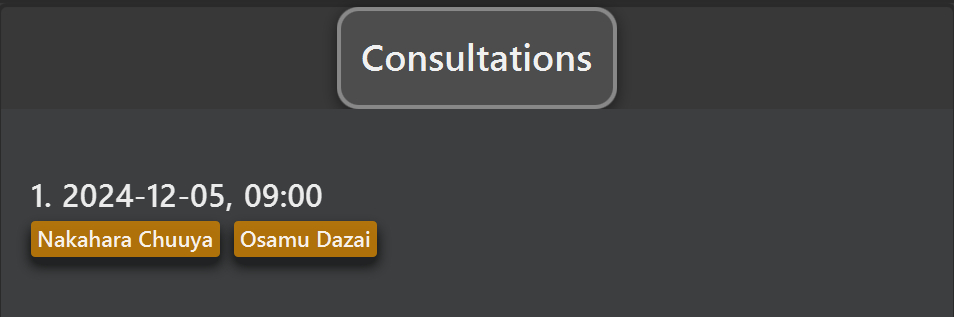
This is an example of a consultation. In this example, Nakahara Chuuya & Osamu Dazai
are in the consultation on 2024-12-05, 09:00.
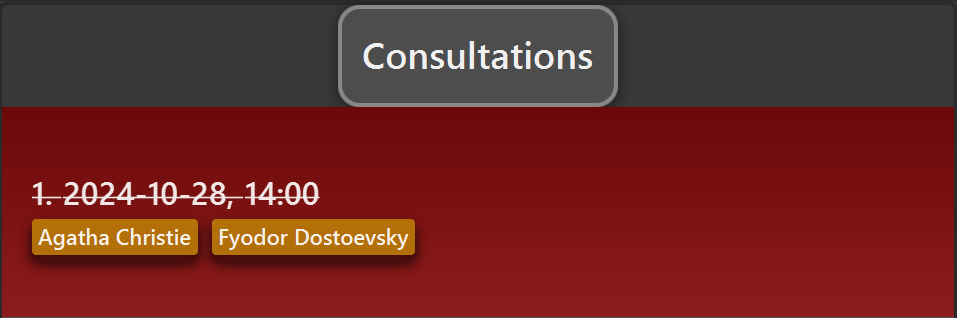
Additionally, consultations that have passed (the time is before your computer’s time) will be displayed in red, as follows:
Consultation Commands
Adding a consultation : addconsult
Adds a new consultation to TAHub.
Format: addconsult d/DATE t/TIME
- The date and time should not conflict with any existing consultation.
- Date format:
YYYY-MM-DD - Time format:
HH:mm
Examples:
-
addconsult d/2024-11-05 t/09:00adds a Consultation Timing that has passed.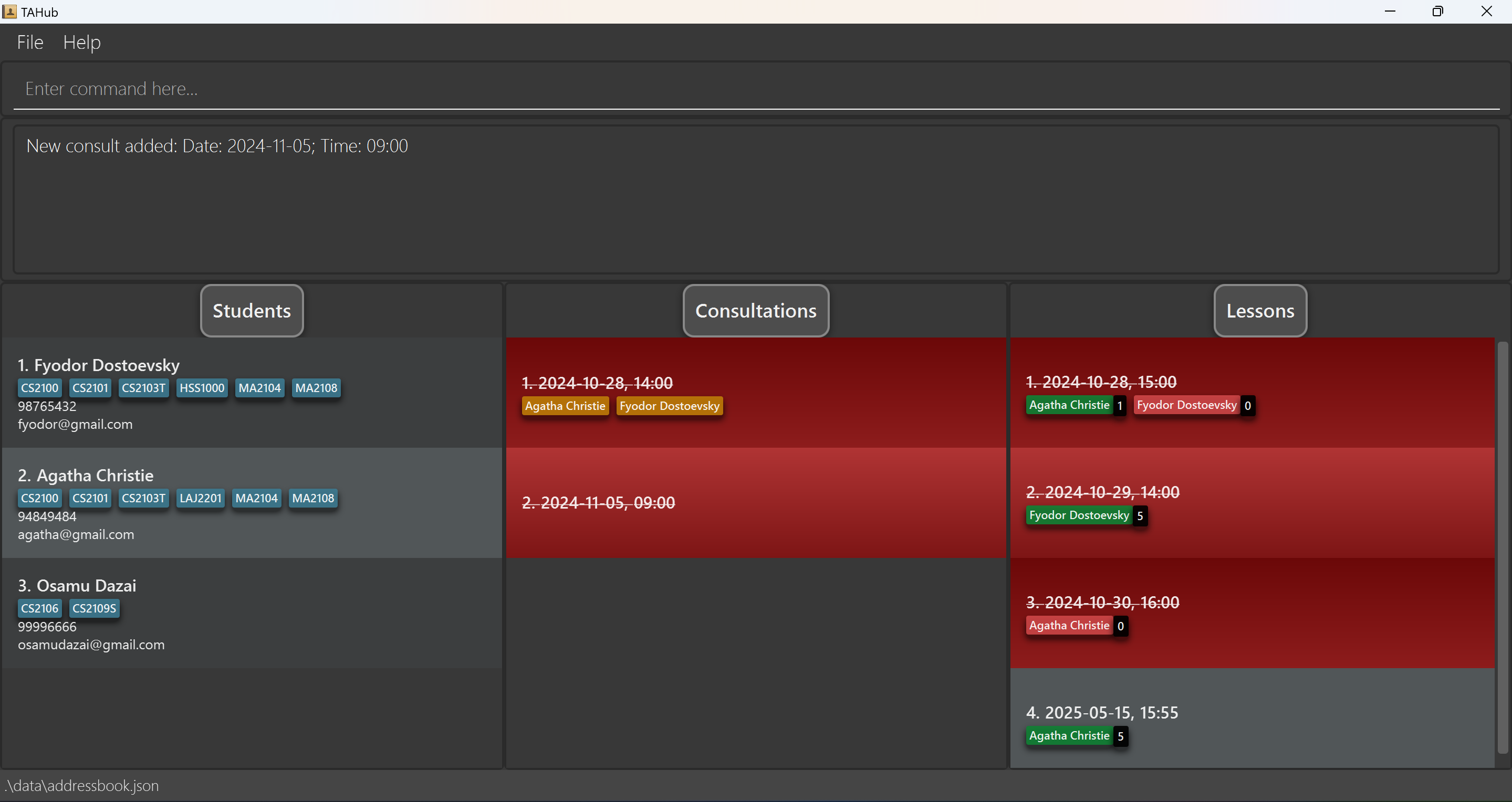
-
addconsult d/3345-01-11 t/01:00adds a Consultation Timing.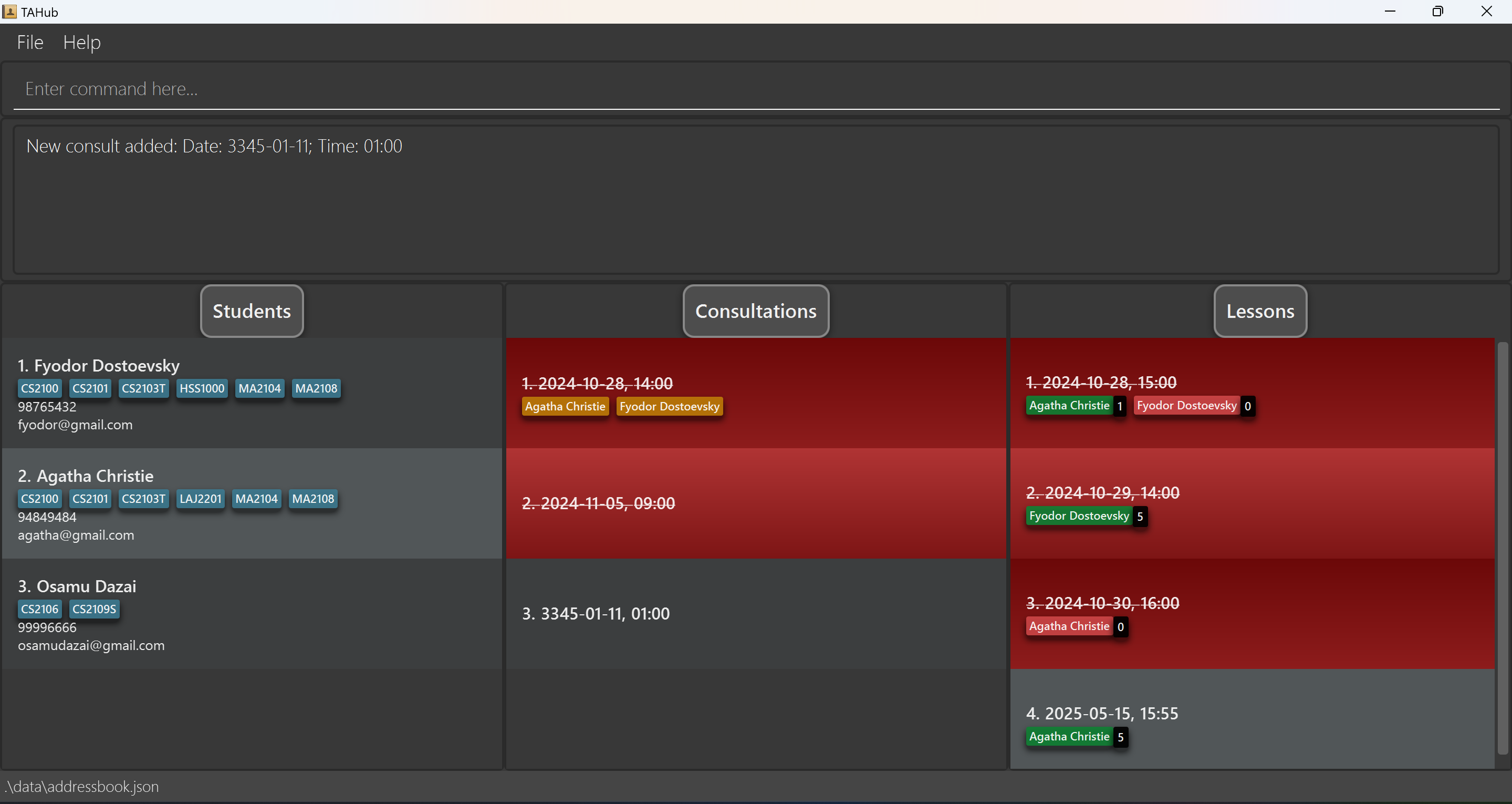
Refreshing the consultation list : listconsults
Refreshes and displays the consultation list. Useful to fix minor UI glitches, e.g. the display not updating after adding a student.
Format: listconsults
Example:
listconsults
Adding students to a consultation : addtoconsult
Adds students to an existing consultation, specified by its index.
Format: addtoconsult INDEX [n/NAME]… [i/INDEX]…
-
INDEXspecifies the consultation to add students to. - Student names (
n/NAME) and/or student indices (i/INDEX) can be used to specify students. At least one name or index must be provided. - Students already in the consultation will not be added again, and an error message will be shown.
- Student names are case-sensitive.
Examples:
addtoconsult 1 n/John Doe n/Harry Ng-
addtoconsult 2 i/3 i/5adds students at indices 3 and 5 in the student list to the 2nd consultation. -
addtoconsult 3 n/Nakahara Chuuya i/3adds students Nakahara Chuuya & Student at Index 3 to the 3rd consultation.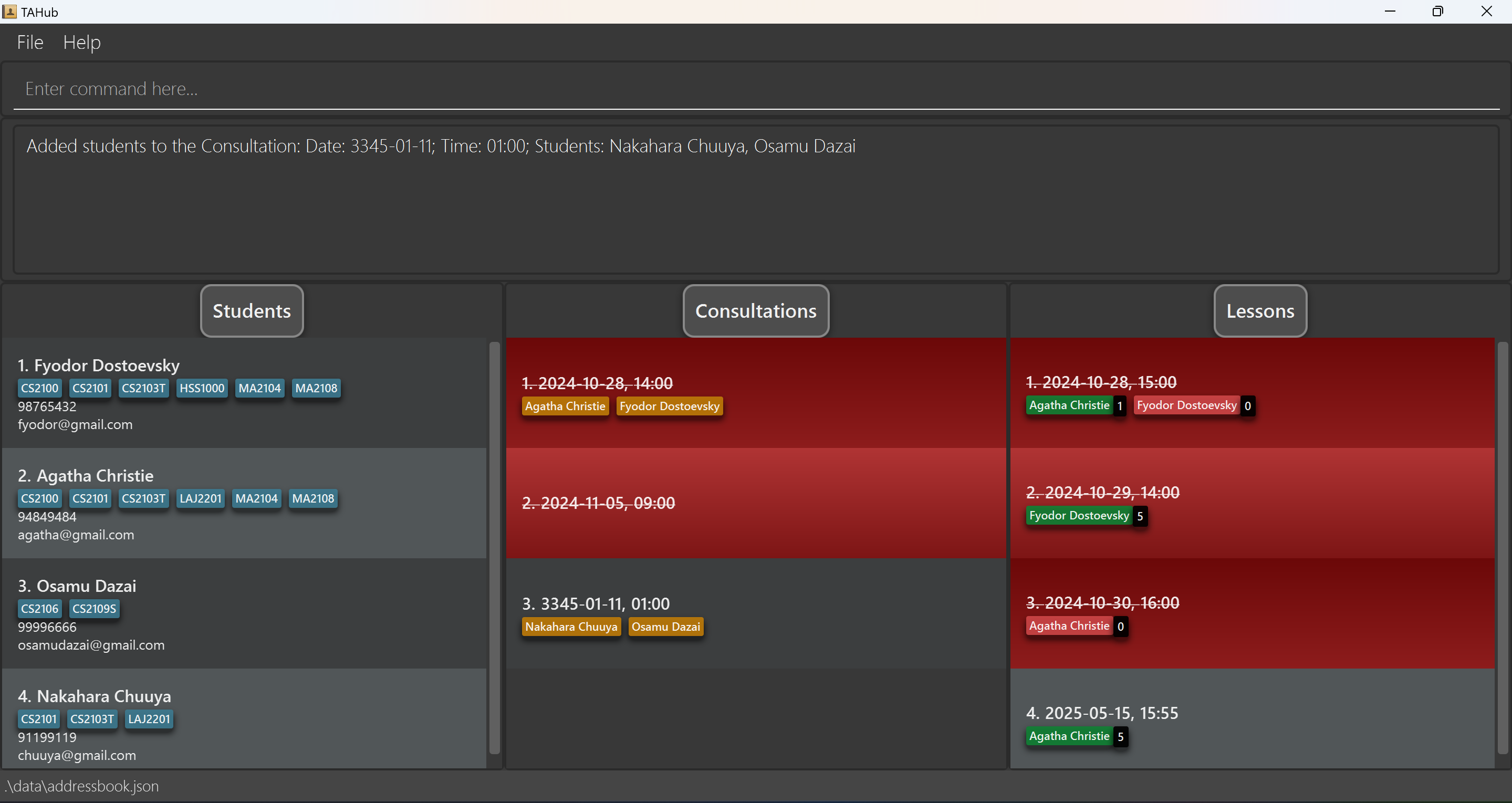
Removing students from a consultation : removefromconsult
Removes specified students from a consultation, identified by its index.
Format: removefromconsult INDEX n/NAME [n/NAME]…
-
INDEXis the index of the consultation from which the students will be removed. - Specify one or more students to remove by their names.
- Student names are case-sensitive.
Examples:
-
removefromconsult 1 n/John Doe n/Harry Ngremoves students named John Doe and Harry Ng from the 1st consultation. -
removefromconsult 3 n/Osamu Dazairemoves student named Osamu Dazai from the 3rd consultation.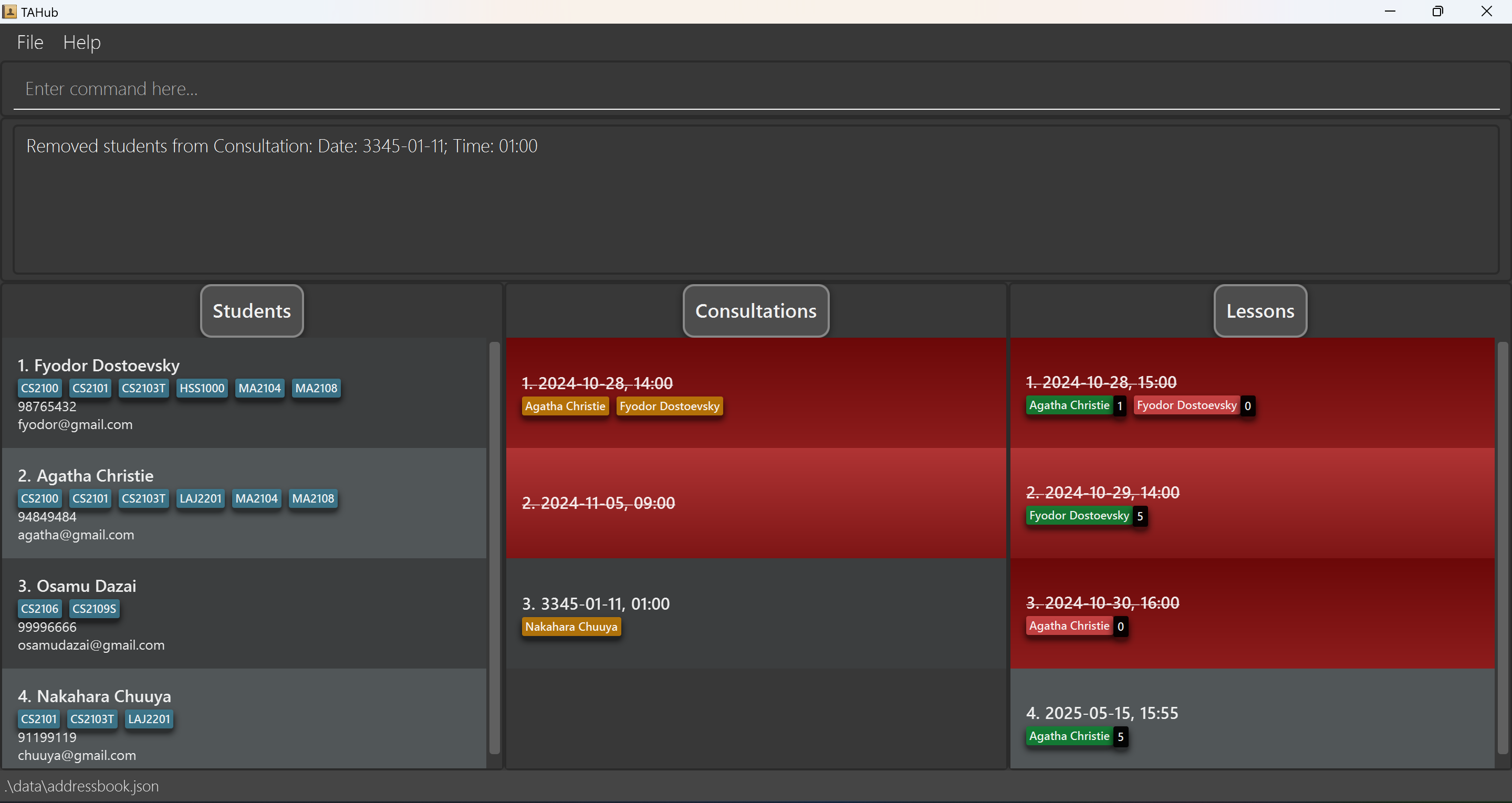
Deleting consultations : deleteconsult
Deletes one or more consultations from TAHub by their indices.
Format: deleteconsult INDEX[;INDEX]…
-
INDEXspecifies the consultation to delete. You can delete multiple consultations by separating indices with semicolons (;).
Examples:
-
deleteconsult 2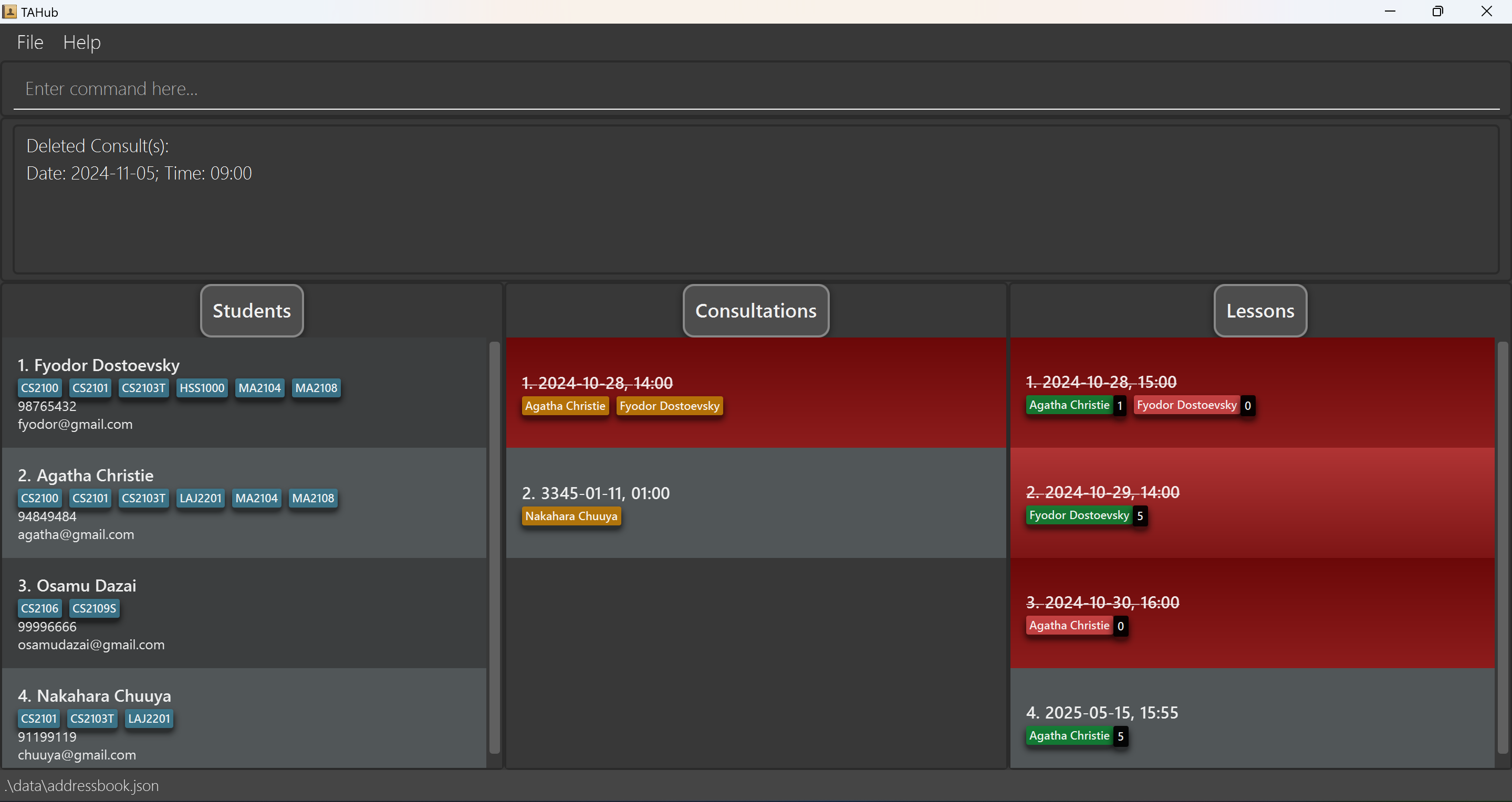
-
deleteconsult 1;3;5(deletes the 1st, 3rd, and 5th consultations)
Exporting consultation data : exportconsult
Exports the current list of consultations to a CSV file.
Format: exportconsult [-f] FILENAME
- Exports consultation data to ‘FILENAME.csv’ in both the data directory and user’s home directory
- The
-fflag is optional and allows overwriting of existing files - The filename must contain only alphanumeric characters (A-Z, a-z, 0-9)
- Files are saved in both the data directory and home directory
- If the home directory copy fails, only the data directory file is created
Examples:
-
exportconsult sessionscreates sessions.csv containing current consultation list -
exportconsult -f consultbackupoverwrites consultbackup.csv if it exists
Importing consultation data : importconsult
Imports consultations from a CSV file into TAHub.
Format: importconsult FILENAME
- The CSV file must have the header: Date,Time,Students
- Files can be read from:
- Data directory (./data/):
importconsult sessions.csv - Current directory:
importconsult ./sessions.csv - Home directory (using ~ prefix):
importconsult ~/documents/sessions.csv - Absolute paths:
importconsult /path/to/sessions.csv
- Data directory (./data/):
- Date must be in YYYY-MM-DD format
- Time must be in HH:mm format (24-hour)
- Students must be semicolon-separated and exist in TAHub
- Consultations with validation errors will be logged in error.csv
- Duplicate consultations are skipped and logged
Examples:
-
importconsult sessions.csvimports consultation data from sessions.csv -
importconsult ~/documents/consultations.csvimports from the home directory
Lessons
The lesson list is shown on the right side of TAHub.
Currently, you can:
- Add and delete lessons
- Add and remove students from lessons
- Mark students’ attendance and participation
In a lesson, students are represented by name tags.
Its color represents their attendance (green for present, red for absent)
The number next to a student’s name represents their participation score.
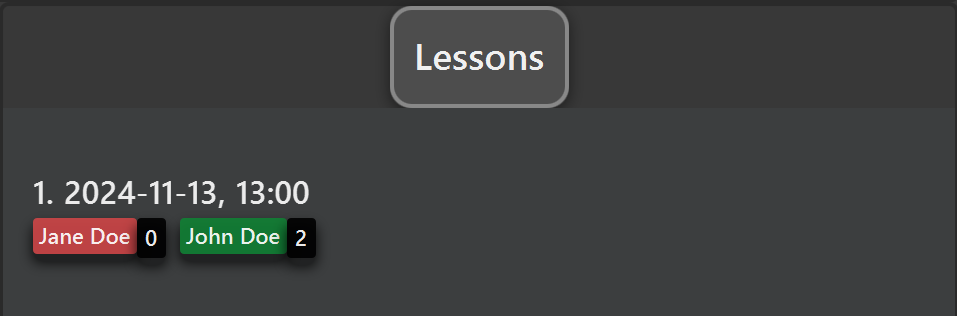
This is an example of a lesson. In this example, Jane Doe is absent,
and has a participation of 0. John Doe is present with a participation
of 2.
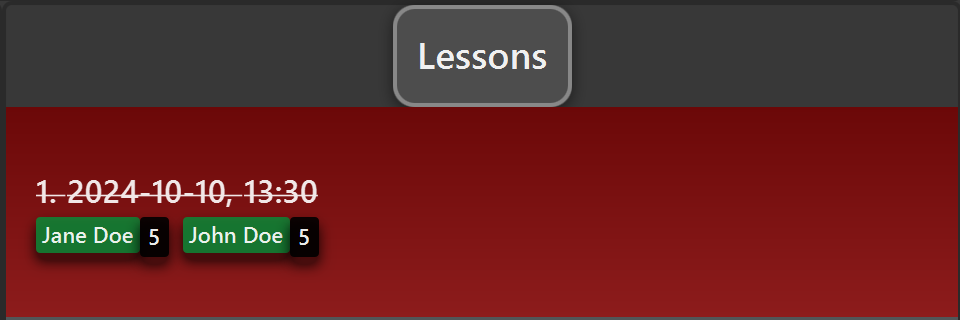
Additionally, lessons that have passed (the time is before your computer’s time) will be displayed in red, as follows:
Lesson Commands
Adding a Lesson : addlesson
Adds a lesson to TAHub. Lessons will be sorted in chronological order in the lesson list.
Format: addlesson d/DATE t/TIME
-
DATEmust be in the formatYYYY-MM-DD, and must be a valid date. -
TIMEmust be in the formatHH:mm, and must be a valid time.
Examples:
-
addlesson d/2024-11-08 t/08:00adds a Lesson Timing that has passed.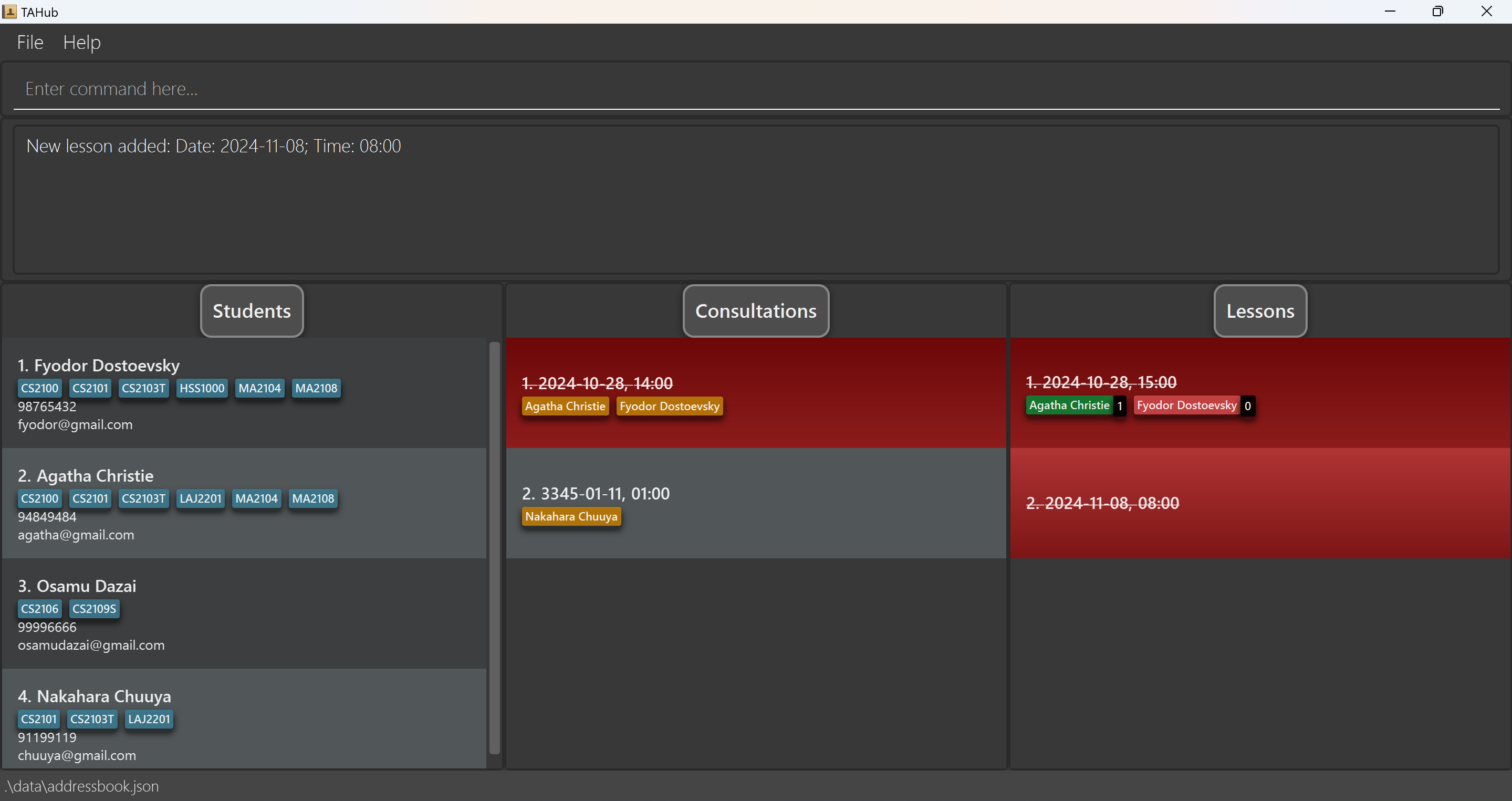
-
addlesson d/3145-11-23 t/01:00adds a Lesson Timing.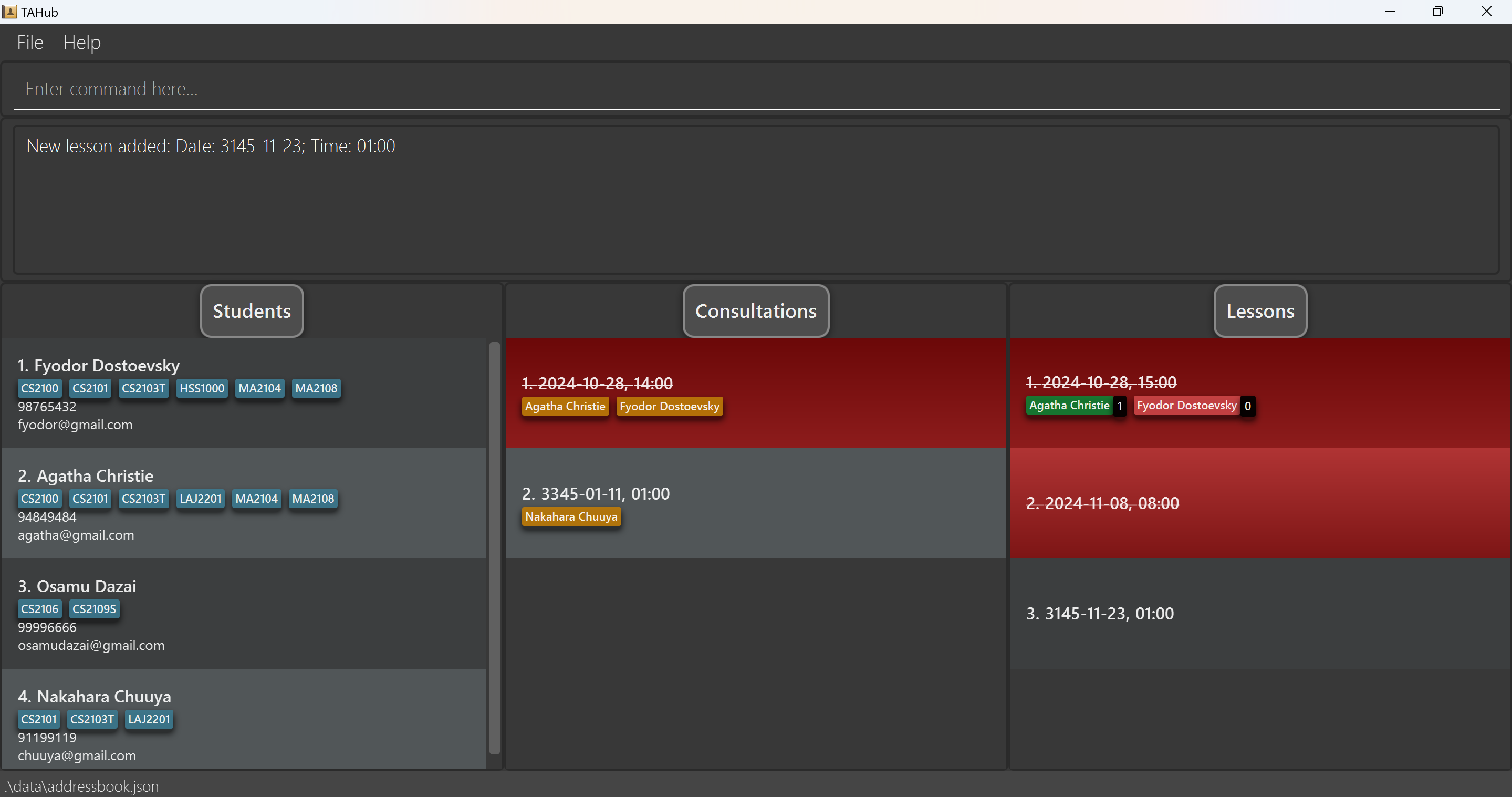
Refreshing the lesson list : listlessons
Refreshes and displays the lesson list. Useful to fix minor UI glitches, e.g. the display not updating after adding a student.
Format: listlessons
Example:
listlessons
Adding a student to a lesson : addtolesson
Adds student(s) to a lesson. Students added to a lesson will be shown as name tags under that lesson inside the lesson list.
Format: addtolesson LESSON_INDEX [n/NAME]… [i/STUDENT_INDEX]…
-
LESSON_INDEXis the index of the lesson as displayed in the lesson list. - At least one of the optional arguments must be provided. There must be at least one name or index.
-
NAMEmust be the full name of a student exactly as shown in the student list. Names are case-sensitive. -
STUDENT_INDEXis the index of a student as displayed in the student list.
Examples:
-
addtolesson 1 n/John DoeaddsJohn Doeto lesson number 1. -
addtolesson 1 n/John Doe i/3 i/5addsJohn Doeand students numbered 3 and 5 to lesson number 1. -
addtolesson 3 n/Nakahara Chuuya i/3adds students Nakahara Chuuya & Student at Index 3 to the 3rd lesson.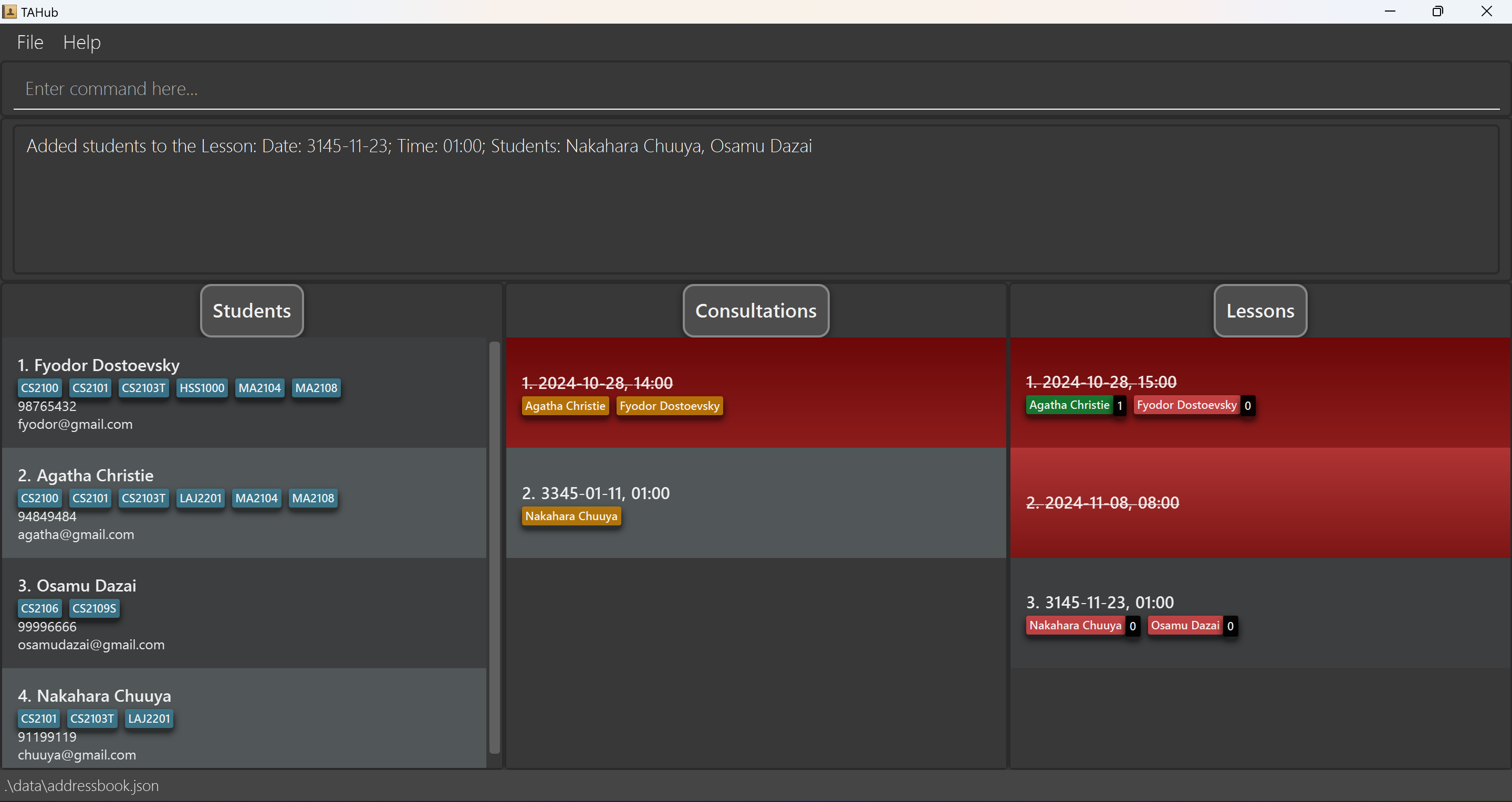
Removing a student from a lesson : removefromlesson
Removes student(s) from a lesson. Removing a student will also remove all data associated with them to that lesson, i.e. re-adding them defaults to no attendance and 0 participation.
Format: removefromlesson LESSON_INDEX n/NAME [n/NAME]…
-
LESSON_INDEXis the index of the lesson as displayed in the lesson list. -
NAMEmust be the full name of a student in the lesson. Names are case-sensitive.
Examples:
-
removefromlesson 1 n/John Doe n/Jane DoeremovesJohn DoeandJane Doefrom lesson number 1. -
removefromlesson 3 n/Osamu Dazairemoves student named Osamu Dazai from the 3rd lesson.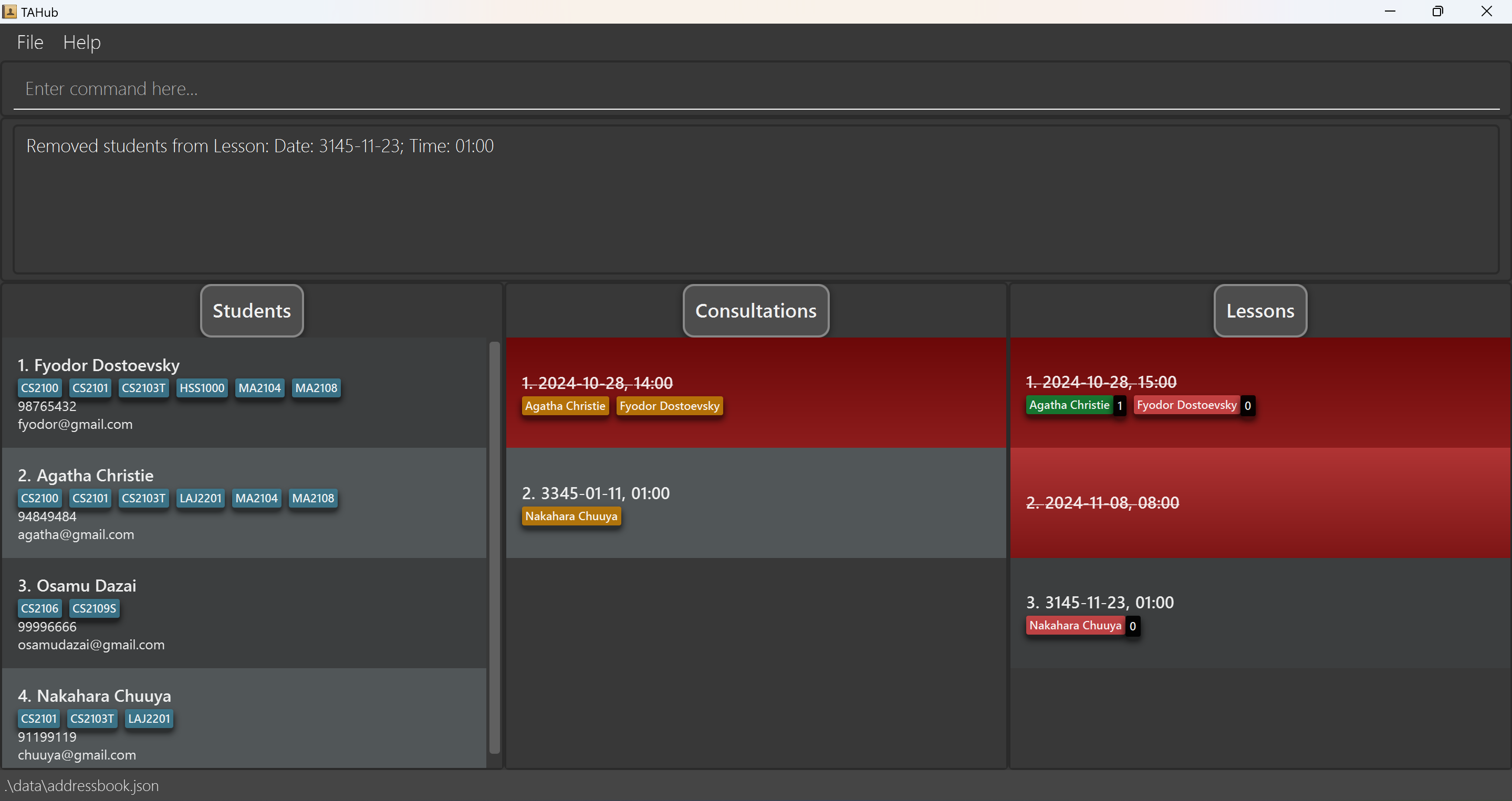
-
Marking a student’s attendance :
marka
Marks student(s)’ attendance in a lesson. The student’s attendance is represented by the color of their name tag under a lesson - green for present and red for absent.
Format: marka LESSON_INDEX n/NAME [n/NAME]… a/ATTENDANCE
-
LESSON_INDEXis the index of the lesson as displayed in the lesson list. -
NAMEmust be the full name of a student in the lesson. Names are case-sensitive. - If multiple names are provided, all their attendances will be set to the given value.
-
ATTENDANCEmust be one of the following:Y,yor1for yes (student is present) andN,nor0for no (student is absent). - There must be exactly 1
ATTENDANCEargument, e.g.a/1 a/1is not allowed.
Examples:
-
marka 1 n/John Doe a/ymarksJohn Doeas present for lesson number 1. -
marka 2 n/John Doe n/Jane Doe a/NmarksJohn DoeandJane Doeas absent for lesson number 2. -
marka 3 n/Nakahara Chuuya a/Ymarks Student Nakahara Chuuya as present for lesson number 3.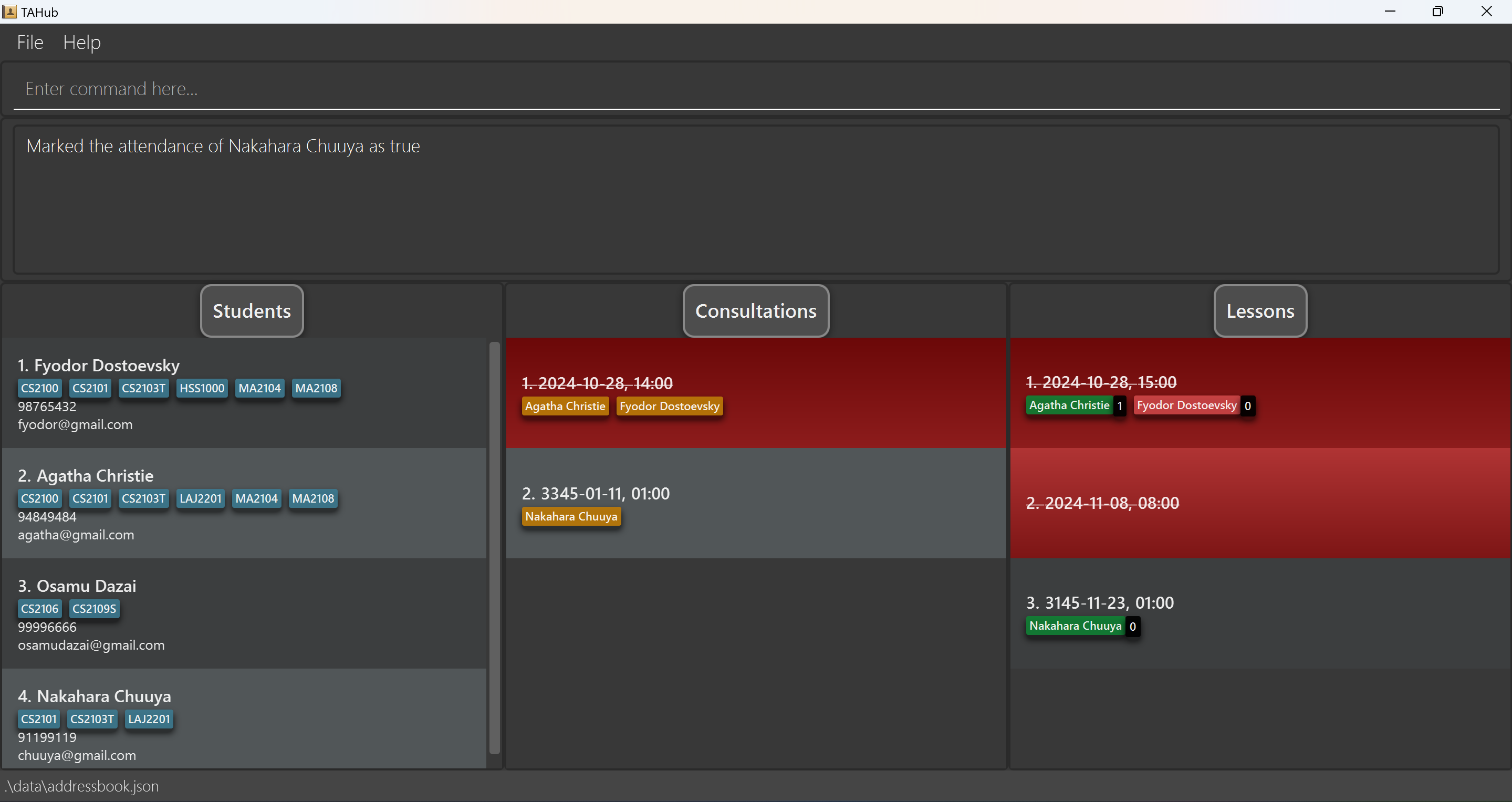
Marking a student’s participation : markp
Marks student(s)’ participation in a lesson. The student’s participation is reflected in the number next to
their name tag under a lesson.
Additionally, setting a student’s participation above 0
will also automatically set their attendance to true.
Format: markp LESSON_INDEX n/NAME [n/NAME]… pt/PARTICIPATION
-
LESSON_INDEXis the index of the lesson as displayed in the lesson list. -
NAMEmust be the full name of a student in the lesson. Names are case-sensitive. -
LESSON_INDEXis the index of the lesson as displayed in the lesson list. -
NAMEmust be the full name of a student in the lesson. - If multiple names are provided, all their participation points will be set to the given value.
-
PARTICIPATIONmust be an integer between 0 and 100 inclusive. - There must be exactly 1
PARTICIPATIONargument, e.g.pt/3 pt/3is not allowed. - The participation score is set exactly to the given value. It does not add onto students’ existing score.
- Due to a bug in the current version, a
+before the participation value will be accepted, i.e.+3is treated as3. This will be removed in a future release.
Examples:
-
markp 1 n/John Doe pt/3marksJohn Doeas having 3 participation marks for lesson number 1. -
markp 2 n/John Doe n/Jane Doe pt/5marksJohn DoeandJane Doeas having 5 participation marks for lesson number 2. -
markp 3 n/Nakahara Chuuya pt/100marks Student Nakahara Chuuya as having 100 participation marks for lesson number 3.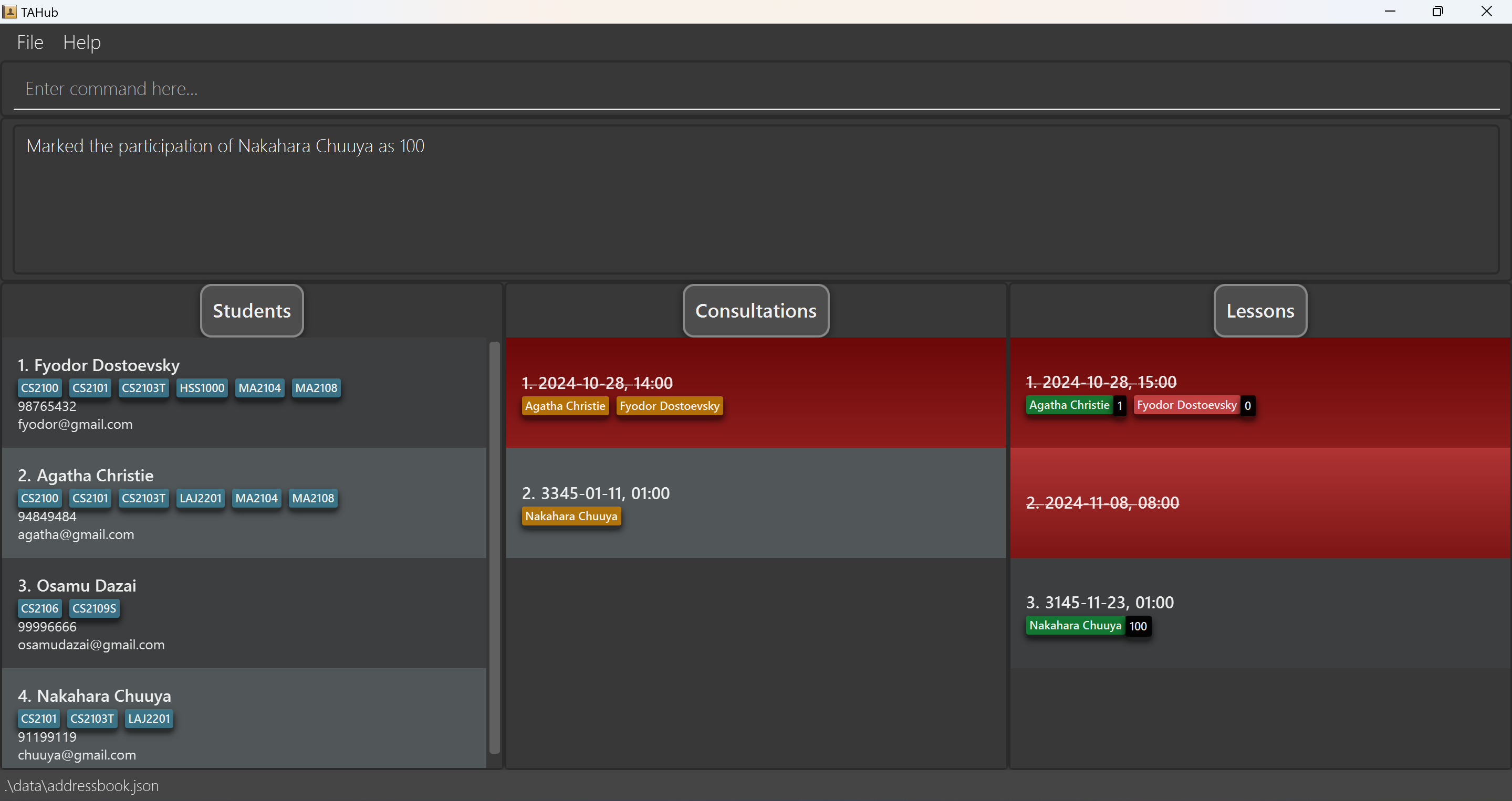
Deleting a lesson : deletelesson
Deletes lesson(s) from TAHub.
Format: deletelesson LESSON_INDEX[;LESSON_INDEX]…
-
LESSON_INDEXis the index of the lesson as displayed in the lesson list.
Examples:
-
deletelesson 2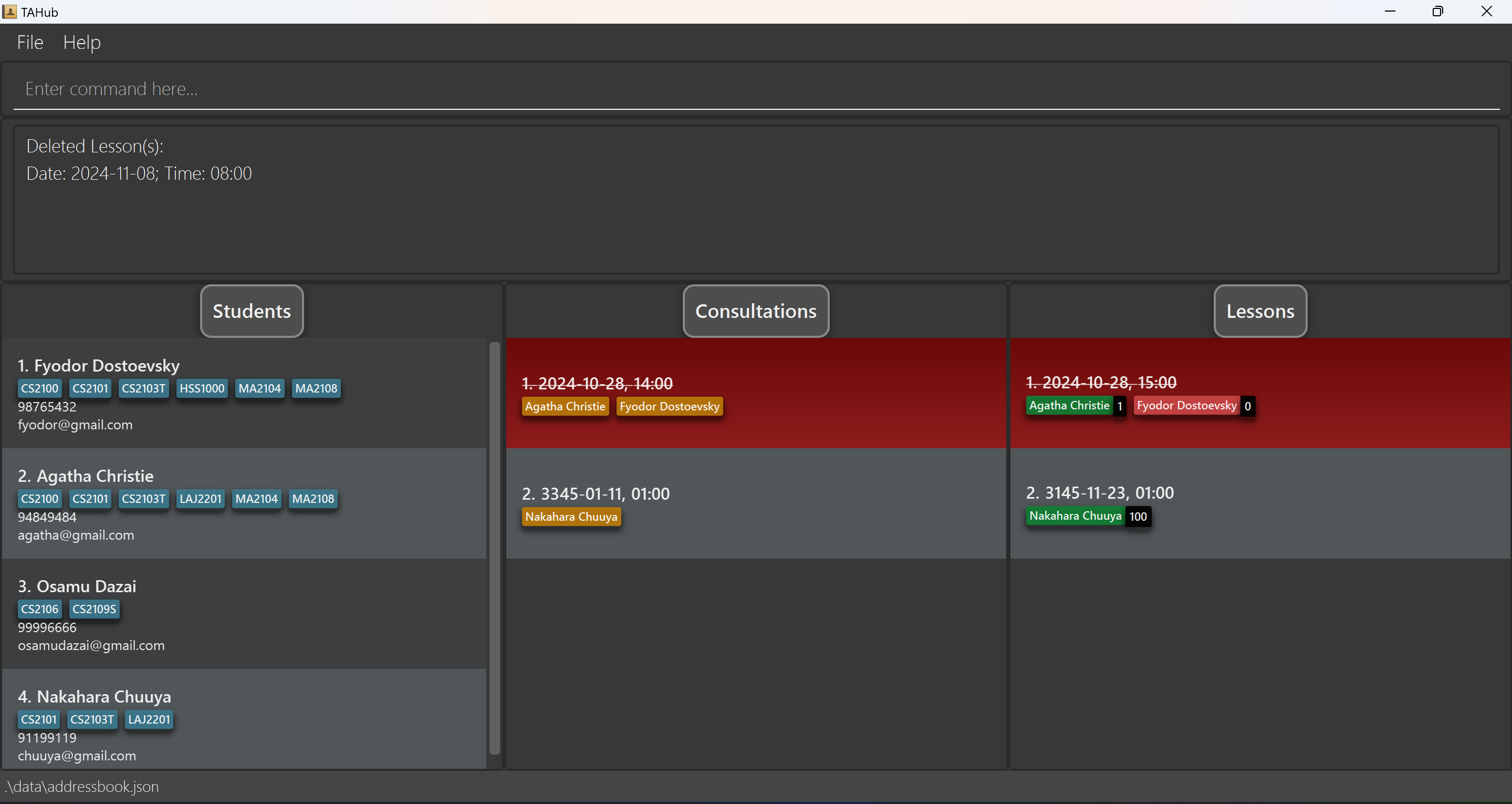
-
deletelesson 1;2;3deletes the lessons numbered 1,2,3 in the lesson list
Storage Operations
Saving the data
TAHub data is saved in the hard disk automatically after any command that changes the data. There is no need to save manually.
Editing the data file
TAHub data are saved automatically as a JSON file [JAR file location]/data/addressbook.json. Advanced users are welcome to update data directly by editing that data file.
 Caution:
If your changes to the data file makes its format invalid, TAHub will discard all data and start with an empty data file at the next run. Hence, it is recommended to take a backup of the file before editing it.
Caution:
If your changes to the data file makes its format invalid, TAHub will discard all data and start with an empty data file at the next run. Hence, it is recommended to take a backup of the file before editing it.Furthermore, certain edits can cause the TAHub to behave in unexpected ways (e.g., if a value entered is outside of the acceptable range). Therefore, edit the data file only if you are confident that you can update it correctly.
Archiving data files [coming in v2.0]
Details coming soon …
FAQ
Q: The Command I entered does not work. What’s Wrong?
A: Check the Instructions for the Command Format in Features. Refer to the Examples provided as necessary.
Q: Can I run TAHub on a Windows, Mac or Linux Computer?
A: Yes. If your Computer has Java 17 or above installed, TAHub will work on Windows, Mac, and Linux Computers.
Q: Will editing / deleting Students in the Student List change the details of existing students in the Consultation / Lesson List?
A: Yes. Any changes made to Students will be reflected immediately in the Consultation & Lesson List.
Q: Can I Import / Export Lesson Data in TAHub?
A: No. The Feature for Importing/Exporting Lesson Data has not been implemented in the current version. Our Team has plans to implement this feature in next version.
Q: Does TAHub require Internet Connection?
A: No. After installation, TAHub does not require internet connection.
Q: Where is the data for TAHub stored?
A: TAHub data are saved automatically as a JSON file in [JAR file location]/data/addressbook.json. You can make a backup of the file if you wish to.
Q: How do I transfer my data to another Computer?
A: Install the app in the other computer and overwrite the empty data file it creates with the file that contains the data of your previous TAHub home folder.
Q: Do I need to manually save the data?
A: TAHub saves automatically after any command that modifies the data. There is no need to save manually.
Q: Can I edit the JSON Data File directly
A: You are strongly not encouraged to edit the JSON data file directly.
You can use the commands as mentioned in the Features to augment any data.
Should the changes made to the data file causes the format to be invalid, TAHub will discard all data and start with an empty data file.
It is highly recommended to make a copy of the date file before editing it.
However, Advanced users are welcome to update data directly by editing that data file.
Known issues
-
When using multiple screens, if you move the application to a secondary screen, and later switch to using only the primary screen, the GUI will open off-screen. The remedy is to delete the
preferences.jsonfile created by the application before running the application again. -
If you minimize the Help Window and then run the
helpcommand (or use theHelpmenu, or the keyboard shortcutF1) again, the original Help Window will remain minimized, and no new Help Window will appear. The remedy is to manually restore the minimized Help Window. - Occasionally, the consults and lessons list may not display properly, i.e. have wrong heights. Try using the relevant list command
listconsultsorlistlessonsto refresh the list. Alternatively, try scrolling the list with a mouse. This should update the display to remedy the bug. - Certain characters cannot be used in student names, such as
/or-, which prevent legitimate parts of names such asS/Ofrom being input. This will be addressed in a future version.
Command summary
| Action | Format, Examples |
|---|---|
| Add |
add n/NAME p/PHONE_NUMBER e/EMAIL [c/COURSE]… e.g., add n/James Ho p/98765432 e/jamesho@example.com c/CS2103T;CS2101
|
| Clear | clear |
| Delete |
delete INDEX [;INDEX]…e.g., delete 3 e.g., delete 2;3;4
|
| Edit |
edit INDEX [n/NAME] [p/PHONE_NUMBER] [e/EMAIL] [c/COURSE]…e.g., edit 2 n/James Lee e/jameslee@example.com c/CS2100e.g., edit 2 c/CS2103T;CS2101;CS2106 e.g., edit 2 c/CS2103T c/CS2101 c/CS2106 e.g., edit 2 c/CS2103T;CS2101 c/CS2106
|
| Find |
find KEYWORD [MORE_KEYWORDS]e.g., find n/James Jake to find all students named James Jake e.g., find n/James;Jake to find all students whose names contain either James or Jake e.g., find c/CS2103T c/CS2100 to find all students who are enrolled both CS2103T and CS2100 e.g., find n/James c/CS2103T to find all students whose names contain James and are enrolled in CS2103T
|
| List Students | liststudents |
| Help | help |
| Export Students |
export [-f] FILENAMEe.g., export students (relative)e.g., export ~/Documents/students (home) |
| Export Consultations |
exportconsult [-f] FILENAMEe.g., exportconsult sessions (relative) e.g., exportconsult ~/Documents/sessions (home) |
| Import Students |
import FILENAMEe.g., import students.csv (relative) e.g., import ~/Documents/students.csv (home) |
| Import Consultations |
importconsult FILENAMEe.g., importconsult sessions.csv (relative) e.g., importconsult ~/Documents/sessions.csv (home) |
| Add Consultation |
addconsult d/DATE t/TIMEe.g., addconsult d/2024-10-20 t/14:00
|
| Add to Consultation |
addtoconsult INDEX [n/NAME]… [i/STUDENT_INDEX]…e.g., addtoconsult 1 n/James Jake n/John Jill i/2 i/3
|
| Remove from Consultation |
removefromconsult INDEX n/NAME…e.g., removefromconsult 1 n/Jake John e.g., removefromconsult 1 n/Jake n/John
|
| Delete Consultations |
deleteconsult INDEX [;INDEX]…e.g., deleteconsult 3 e.g., deleteconsult 2;3;4
|
| List Consultations | listconsults |
| Add Lesson |
addlesson d/DATE t/TIMEe.g., addlesson d/2024-10-20 t/14:00
|
| Add to Lesson |
addtolesson INDEX [n/NAME]… [i/STUDENT_INDEX]…e.g., addtolesson 1 n/James Jake n/John Jill i/2 i/3
|
| Remove from Lesson |
removefromlesson INDEX n/NAME…e.g., removefromlesson 1 n/Jake John e.g., removefromlesson 1 n/Jake n/John
|
| Delete Lesson |
deletelesson INDEX [;INDEX]…e.g., deletelesson 3 e.g., deletelesson 2;3;4
|
| List Lessons | listlessons |
| Mark Attendance for Lesson |
marka INDEX n/NAME… a/ATTENDANCEe.g., marka 3 n/Jack a/y e.g., marka 3 n/Jack n/Jill a/1 e.g., marka 3 n/Jack a/n e.g., marka 3 n/Jack a/0
|
| Mark Participation for Lesson |
markp INDEX n/NAME… pt/POINTSe.g., markp 3 n/Jack pt/75
|